





How To Activate Microsoft Office Application by phone at OpenSmartTech?
Activating Microsoft Office by phone is a reliable alternative to online activation, especially if you’re encountering errors or don’t have internet access. This guide will walk you step-by-step through activating Microsoft Office 2021, 2019, 2016, or Office 2024 Professional Plus using the official Microsoft phone activation system.
🔑 You Need an Activation Key First!
To complete the phone activation, you must have a genuine product key. If you haven’t bought one yet, don’t worry—we’ve got you covered.
👉 Get Your Office Product Key Now
Windows Server 2019 Remote Desktop Services (RDS) – 50 Device CALs
In stock
Windows Server 2016 Remote Desktop Services (RDS) – 50 User CAL
In stock
Windows Server 2016 Remote Desktop Services (RDS) – 50 Device CALs
In stock
Windows 8.1 Professional OEM
In stock
📝 Step-by-Step: Microsoft Office Phone Activation
✅ Step 1: Download Microsoft Office
Make sure to download the correct version of Microsoft Office that matches your product key. Here are some direct ISO links you can use:
💡 All downloads provided are 100% official and clean ISO files directly sourced from Microsoft (NOTE : Make Sure t buy one by clicking Here and you will get Instant Key via Your mail).
✅ Step 2: Install the Office Application
-
Once you download the ISO file, right-click and choose “Mount.”
-
Open the newly mounted drive and run the setup file to begin installation.
-
Follow the prompts and install your chosen version of Office.
🔧 After installation, launch any Office app like Word or Excel. It will prompt you to activate the software.
🚫 Common Error: Online Activation Fails
If you try activating online, you might see a common error like:
“This product key cannot be used for online activation. Please try phone activation instead.”
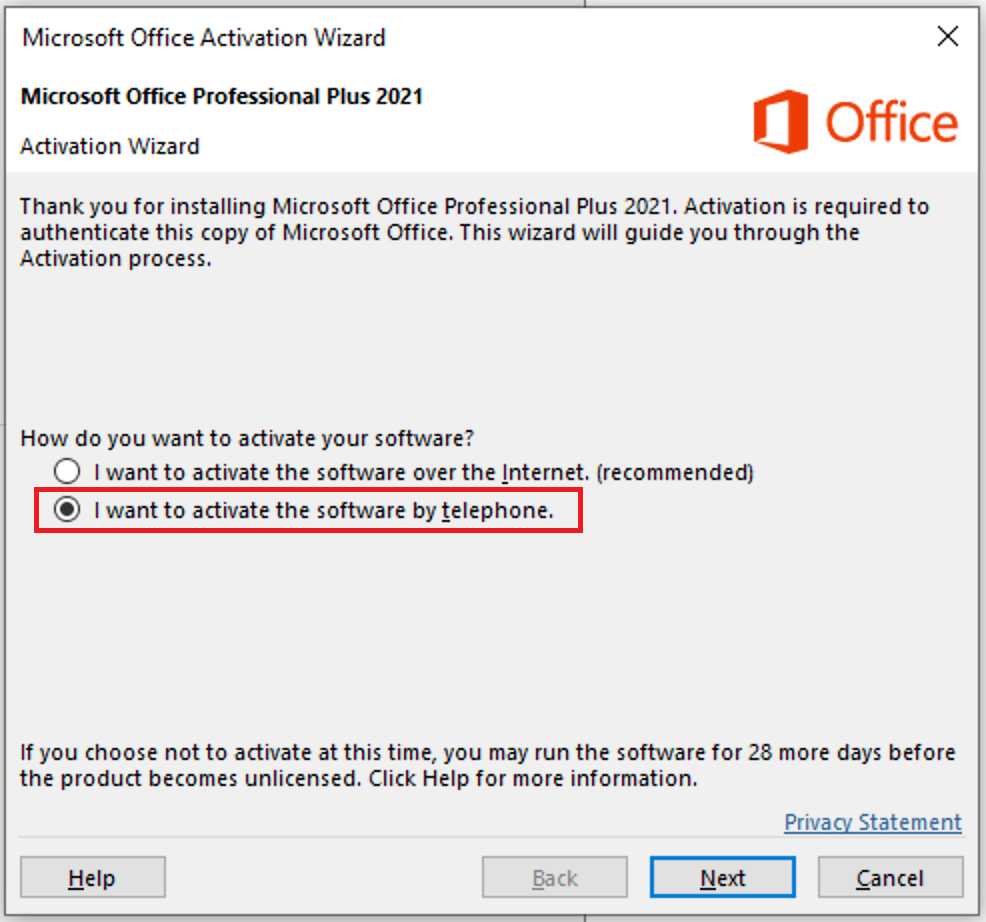
In such cases, click “Back” and choose “I want to activate the software by telephone.”
📱 Step 3: Activate by Phone
🔹 Enter the Product Key
First, enter the product key you received from us on opensmarttech.net.
🔹 Select “Phone Activation”
-
On the activation wizard, select “Activate by phone” and click Next.
-
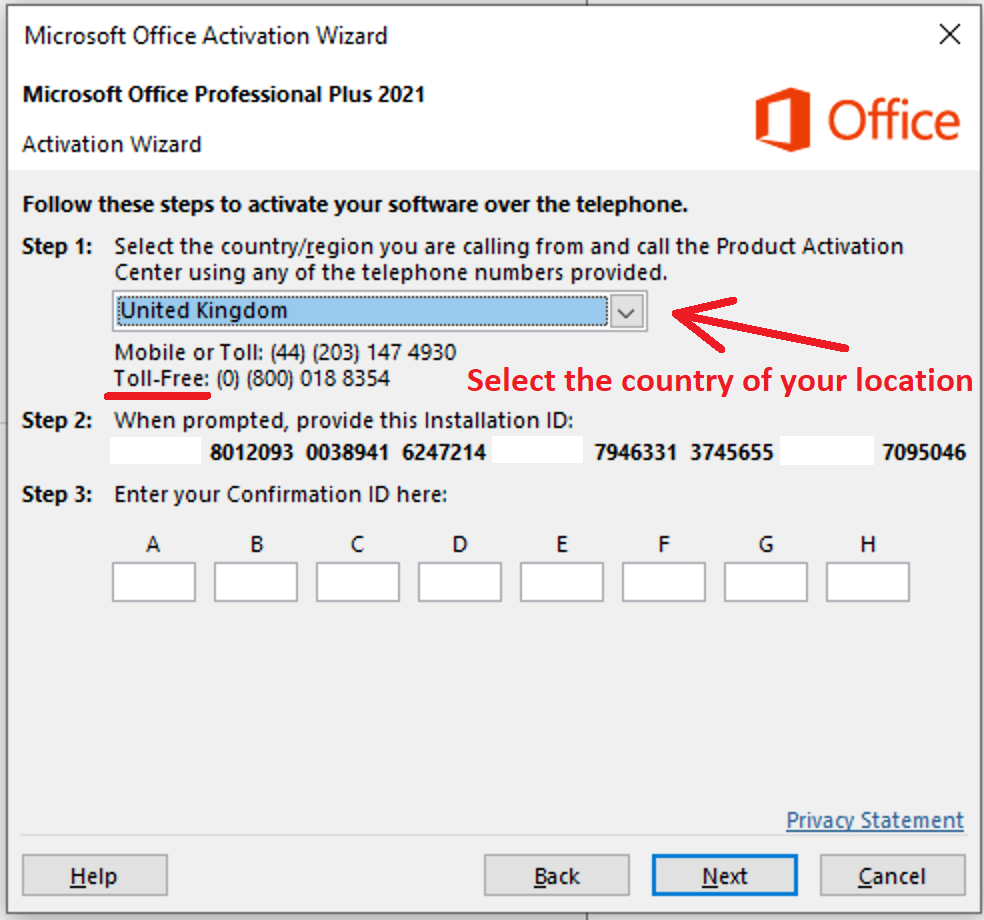
Choose your country/region from the list (e.g., United Kingdom).
📞 A toll-free number will appear. Call that number and follow the robot instructions.
☎️ Step 4: Phone Instructions – What to Expect
-
Call the number and follow the prompts:
-
Press 1 to consent to call recording
-
Press 3 for Microsoft Office activation
-
Press 1 again to continue
-
-
Enter the Installation ID shown on your screen using your phone keypad.
⚠️ The robot will ask how many devices this product key is used on. Reply “zero”.
-
The robot will then give you the Confirmation ID.
-
Enter that Confirmation ID into the fields labeled A to H on your screen and click Next to complete the activation.
🧩 Alternate Method: Activate Without Calling
If you prefer not to activate by phone call, we’ve got you covered!
✅ Simply send us your Installation ID via WhatsApp, and we’ll reply with your Confirmation ID to complete your Microsoft Office activation.
📸 Make sure to send us a clear screenshot of your Installation ID, or you can write it out manually if that’s easier.
📲 Contact us on WhatsApp: +44 7 537 146 733
🕒 We typically respond within minutes during business hours!
Let us take care of the rest so you can get your Office up and running in no time.
🎉 Final Step: Successful Activation
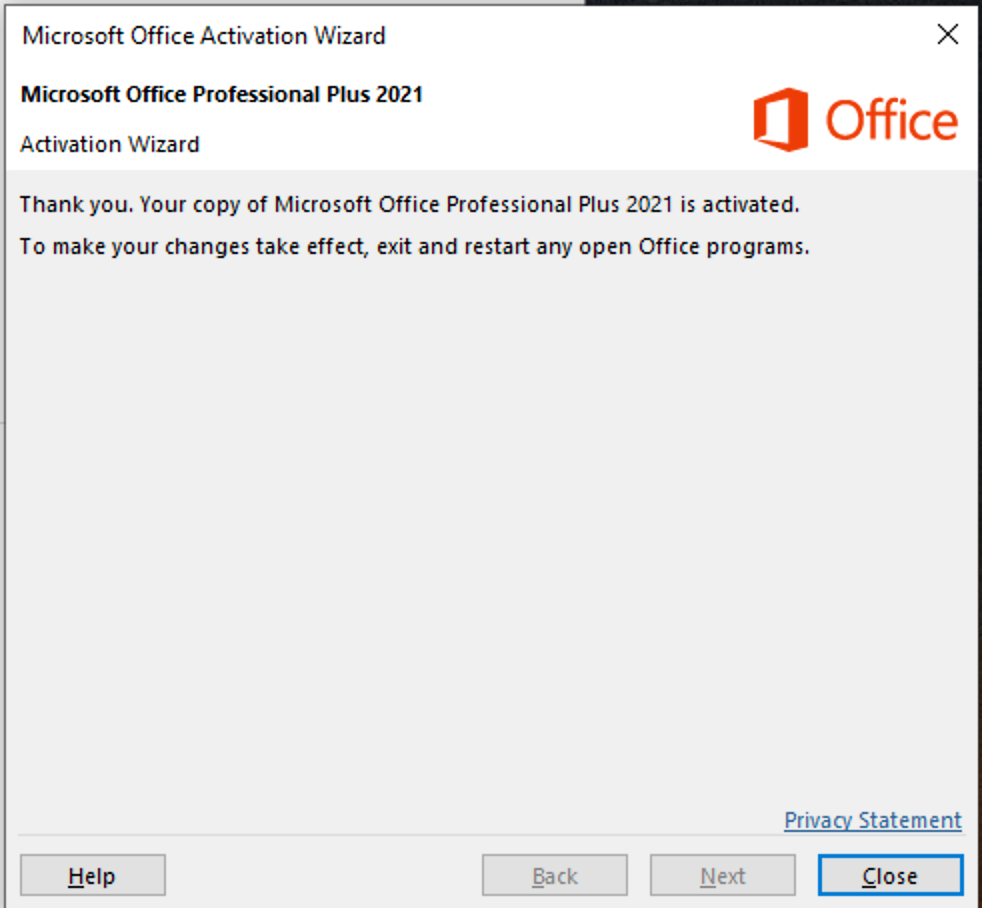
If all goes well, the Office Activation Wizard will confirm a successful activation. You can now use your Microsoft Office without any limitations.
🛍️ Get Genuine Office Keys – Instant Delivery
Need a key to activate Office right now? We provide 100% genuine Microsoft Office keys with instant email delivery and full support:
💬 Need help? Message us on WhatsApp for instant support.
Windows Server 2019 Remote Desktop Services (RDS) – 50 Device CALs
In stock
Windows Server 2016 Remote Desktop Services (RDS) – 50 User CAL
In stock
Windows Server 2016 Remote Desktop Services (RDS) – 50 Device CALs
In stock
Windows 8.1 Professional OEM
In stock
Get top-quality software at unbeatable prices on OpenSmartTech.net
01. SECURE & RELIABLE
Shop with confidence—SSL encryption ensures a safe and hassle-free experience.

02. INSTANT ACCESS
Download and activate your software immediately after purchase.

03. SIMPLE INSTALLATION
Step-by-step instructions make setup and activation effortless.