





Anleitungen installieren

Wie man Microsoft aktiviert Büro Telefonische Bewerbung bei OpenSmartTech?

Activating Microsoft Office by phone is a reliable alternative to online activation, especially if you’re encountering errors or don’t have internet access. This guide will walk you step-by-step through activating Microsoft Office 2021, 2019, 2016, oder Office 2024 Professional Plus using the official Microsoft phone activation system.

🔑 You Need an Activation Key First!

To complete the phone activation, you must have a genuine product key. If you haven’t bought one yet, don’t worry—we’ve got you covered.

👉 Get Your Office Product Key Now

Microsoft 365 Apps for Enterprise CSP

Auf Lager

Der ursprüngliche Preis war: £314.42.Current price is: £84.95.

Microsoft 365 Business Basic CSP

Auf Lager

Der ursprüngliche Preis war: £127.42.Der aktuelle Preis ist: £74.95.

Microsoft 365 Business Premium CSP

Auf Lager

Der ursprüngliche Preis war: £458.92.Der aktuelle Preis ist: £89.95.

Microsoft 365 Business Standard

Auf Lager

Original price was: £203.92.Der aktuelle Preis ist: £89.95.

📝 Step-by-Step: Microsoft Office Phone Activation

✅ Step 1: Download Microsoft Office

Make sure to download the correct version of Microsoft Office that matches your product key. Here are some direct ISO links you can use:

💡 All downloads provided are 100% official and clean ISO files directly sourced from Microsoft (NOTE : Make Sure t buy one by clicking Here and you will get Instant Key via Your mail).

✅ Step 2: Install the Office Application

  1. Once you download the ISO file, right-click and choose “Mount.”

  2. Open the newly mounted drive and run the setup file to begin installation.

  3. Follow the prompts and install your chosen version of Office.

🔧 After installation, launch any Office app like Word or Excel. It will prompt you to activate the software.

🚫 Common Error: Online Activation Fails

If you try activating online, you might see a common error like:

“This product key cannot be used for online activation. Please try phone activation instead.”

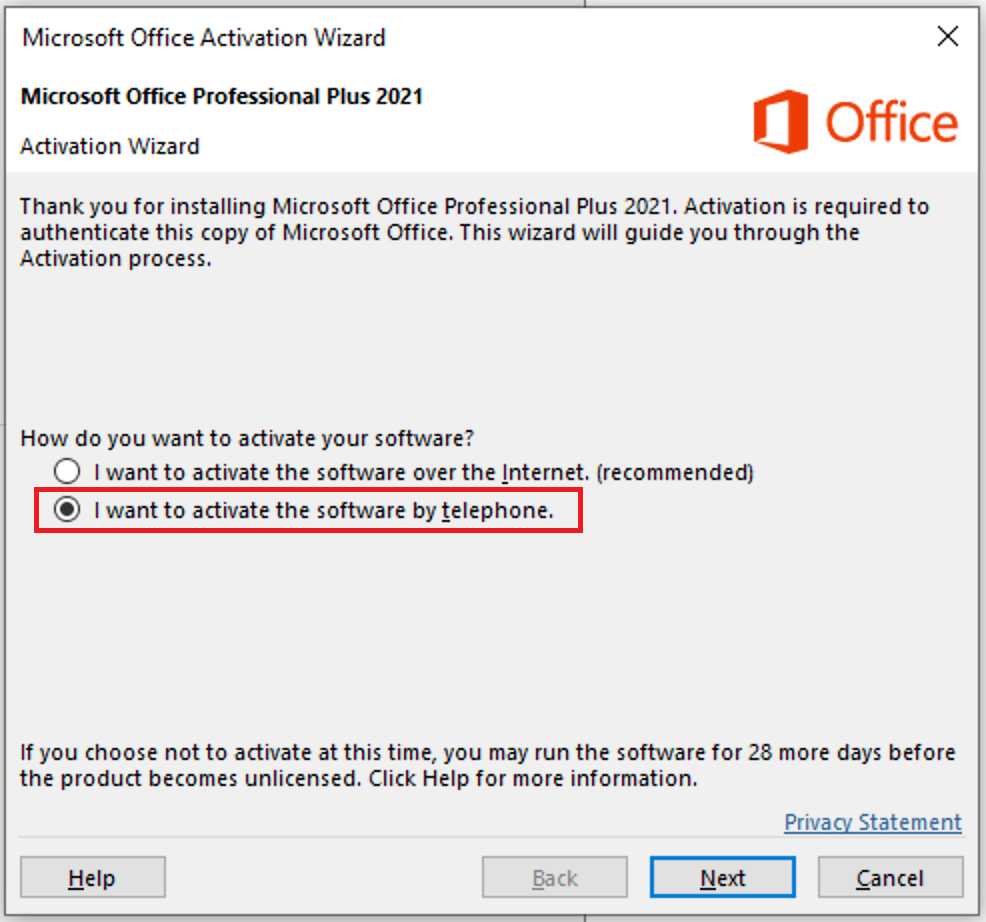
In such cases, click “Back” and choose “I want to activate the software by telephone.”

📱 Step 3: Activate by Phone

🔹 Enter the Product Key

First, enter the product key you received from us on opensmarttech.net.

🔹 Select “Phone Activation”

  1. On the activation wizard, select “Activate by phone” and click Nächste.

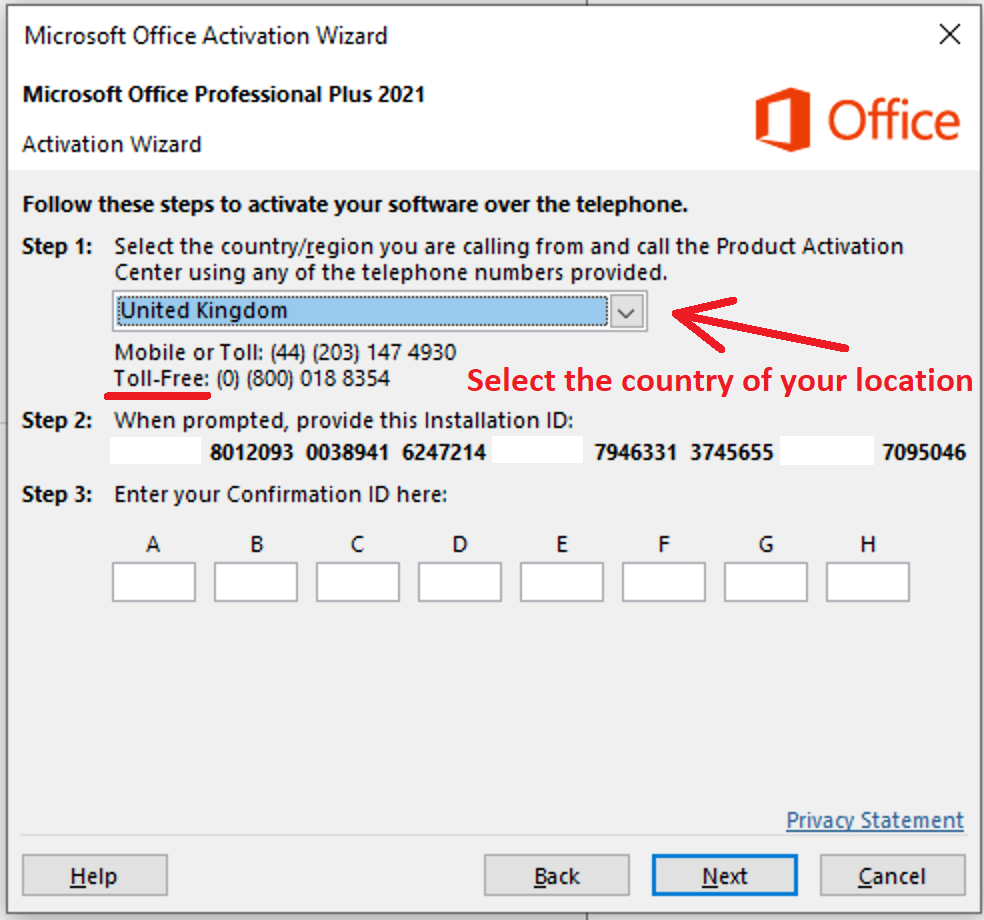
  2. Choose your country/region from the list (e.g., United Kingdom).

📞 A toll-free number will appear. Call that number and follow the robot instructions.

☎️ Step 4: Phone Instructions – What to Expect

  1. Call the number and follow the prompts:

    • Press 1 to consent to call recording

    • Press 3 for Microsoft Office activation

    • Press 1 again to continue

  2. Enter the Installation ID shown on your screen using your phone keypad.

⚠️ The robot will ask how many devices this product key is used on. Reply “zero”.

  1. The robot will then give you the Confirmation ID.

  2. Enter that Confirmation ID into the fields labeled A to H on your screen and click Nächste to complete the activation.

🧩 Alternate Method: Activate Without Calling

If you prefer not to activate by phone call, we’ve got you covered!

✅ Simply send us your Installation ID via WhatsApp, and we’ll reply with your Confirmation ID to complete your Microsoft Office activation.

📸 Make sure to send us a clear screenshot of your Installation ID, or you can write it out manually if that’s easier.

📲 Contact us on WhatsApp: +44 7 537 146 733

🕒 We typically respond within minutes during business hours!

Let us take care of the rest so you can get your Office up and running in no time.

👉 GET CID – Microsoft Self-Service Support 

🎉 Final Step: Successful Activation

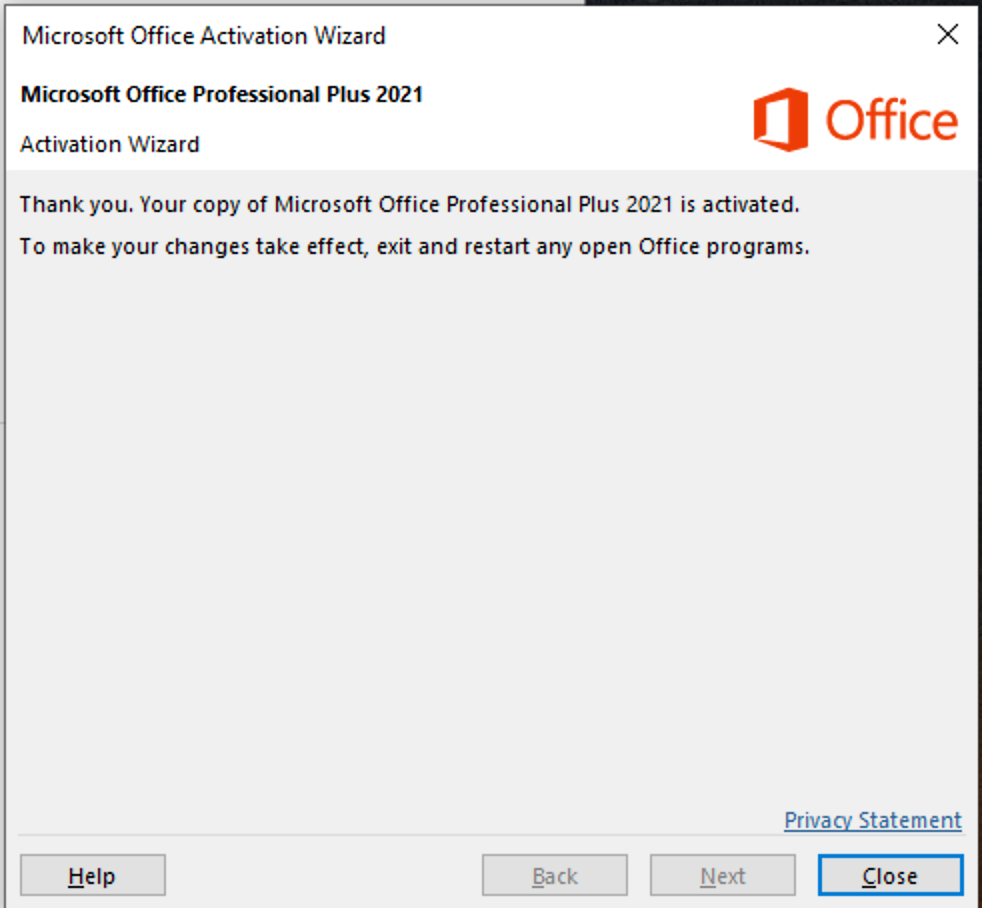
If all goes well, the Office Activation Wizard will confirm a successful activation. You can now use your Microsoft Office without any limitations.

🛍️ Get Genuine Office Keys – Instant Delivery

Need a key to activate Office right now? We provide 100% genuine Microsoft Office keys with instant email delivery and full support:

💬 Need help? Message us on WhatsApp for instant support.

Microsoft 365 Apps for Enterprise CSP

Auf Lager

Der ursprüngliche Preis war: £314.42.Current price is: £84.95.

Microsoft 365 Business Basic CSP

Auf Lager

Der ursprüngliche Preis war: £127.42.Der aktuelle Preis ist: £74.95.

Microsoft 365 Business Premium CSP

Auf Lager

Der ursprüngliche Preis war: £458.92.Der aktuelle Preis ist: £89.95.

Microsoft 365 Business Standard

Auf Lager

Original price was: £203.92.Der aktuelle Preis ist: £89.95.
Softwarekauf leicht gemacht!

Erhalten Sie hochwertige Software zu unschlagbaren Preisen auf OpenSmartTech.net

01. SICHER & VERlässlich

Shoppen mit Vertrauen—SSL-Verschlüsselung sorgt für eine sichere und problemlose Erfahrung.

02. STÄNDIGER ZUGANG

Laden und aktivieren Sie Ihre Software sofort nach dem Kauf.

03. EINFACHANLAGEN

Schritt-für-Schritt-Anweisungen machen die Einrichtung und Aktivierung mühelos.

Schreibe einen Kommentar

Ihre E-Mail-Adresse wird nicht veröffentlicht. Erforderliche Felder sind markiert *